Self Assessment for Sole Traders: 2026 Guide
A practical self assessment for sole traders guide: the £1,000 rule, SA100 expenses, 31 January payment and Making Tax Digital from April 2026.
You've finished a client project, paid for software and equipment, and opened your banking app to find there's barely anything left. Your first thought is that there can't be much tax to worry about. But a thin bank balance doesn't tell you whether you need to register, file a return or put money aside for HMRC.
Self Assessment for sole traders starts with what you earned before expenses, not what you kept. Get that distinction right, then build a routine around your records, your return and the money needed to pay the bill.
Table of Contents
- Who Must File and Which Dates Apply
- How to Register and Keep the Records
- Complete the SA100 and Claim Allowable Costs
- Freelancer Checks Before You Submit
- Pay the Bill and Fund Payments on Account
- Prepare for Making Tax Digital from April 2026
- File It Yourself or Hand It Over
Who Must File and Which Dates Apply
Say you're a North London designer whose client income has passed the registration threshold, but buying a computer and paying for subscriptions has wiped out your profit. You might owe little tax on the trade. That doesn't automatically remove your filing obligation.
The HMRC sole trader registration guide says registration becomes compulsory when gross trading income exceeds £1,000 in a tax year running from 6 April to the following 5 April, before deducting expenses. It also sets the normal notification deadline at 5 October after the relevant tax year, with online filing and payment normally due the following 31 January and payments on account potentially due on 31 January and 31 July.
Put the obligation before the tax calculation
Turnover means your business income before costs. Profit is what remains after the relevant deductions. Don't use profit to decide whether you crossed a turnover-based registration threshold.
You should also separate registration from payment. Telling HMRC that you're self-employed creates the route to reporting your income; it doesn't mean HMRC has already calculated your bill. Your eventual liability can include Income Tax and National Insurance, depending on your circumstances.
Sole trader Self Assessment dates
| What | When | What it covers |
|---|---|---|
| Trading income over the registration threshold | During the tax year | Gross turnover before expenses; registration becomes compulsory |
| Tell HMRC you must file | October notification deadline after the relevant tax year | Notification for a new Self Assessment record |
| Paper tax return | The earlier paper-filing deadline, which you should confirm before choosing this route | Paper submission rather than online filing |
| Online return and balancing payment | January deadline following the tax year | The return and any outstanding tax and National Insurance |
| Second payment on account | July payment deadline, where applicable | A further advance towards the next year's liability |
Use the Self Assessment deadline guide to identify the filing and payment dates relevant to your return. Put registration, submission and payment in your diary as separate tasks, rather than creating a single reminder labelled tax.
Low profit isn't a reason to ignore registration
Voluntary registration can also be useful below the compulsory threshold, for example where you need evidence of self-employment or want to establish your National Insurance position. Check what registration will achieve in your circumstances instead of assuming that submitting a return automatically gives you the outcome you need.
Practical rule: Check the filing obligation using turnover. Work out the tax bill using the correct profit calculation.
This week, establish which tax year contains your first trading income and whether you've already crossed the registration threshold. Your next date is the earliest outstanding registration, filing or payment deadline, not whichever one feels furthest away.
How to Register and Keep the Records
Registering is the administrative job. Keeping a reliable record of what happened is the continuing job, and it deserves more attention than choosing the prettiest accounting dashboard.
HMRC's self-employment return guidance explains the cash-basis treatment available to eligible traders and the need to retain supporting records, even though evidence doesn't normally accompany the return. Build your system so every annual total can be traced back to actual transactions.
Set up the account and the bookkeeping together
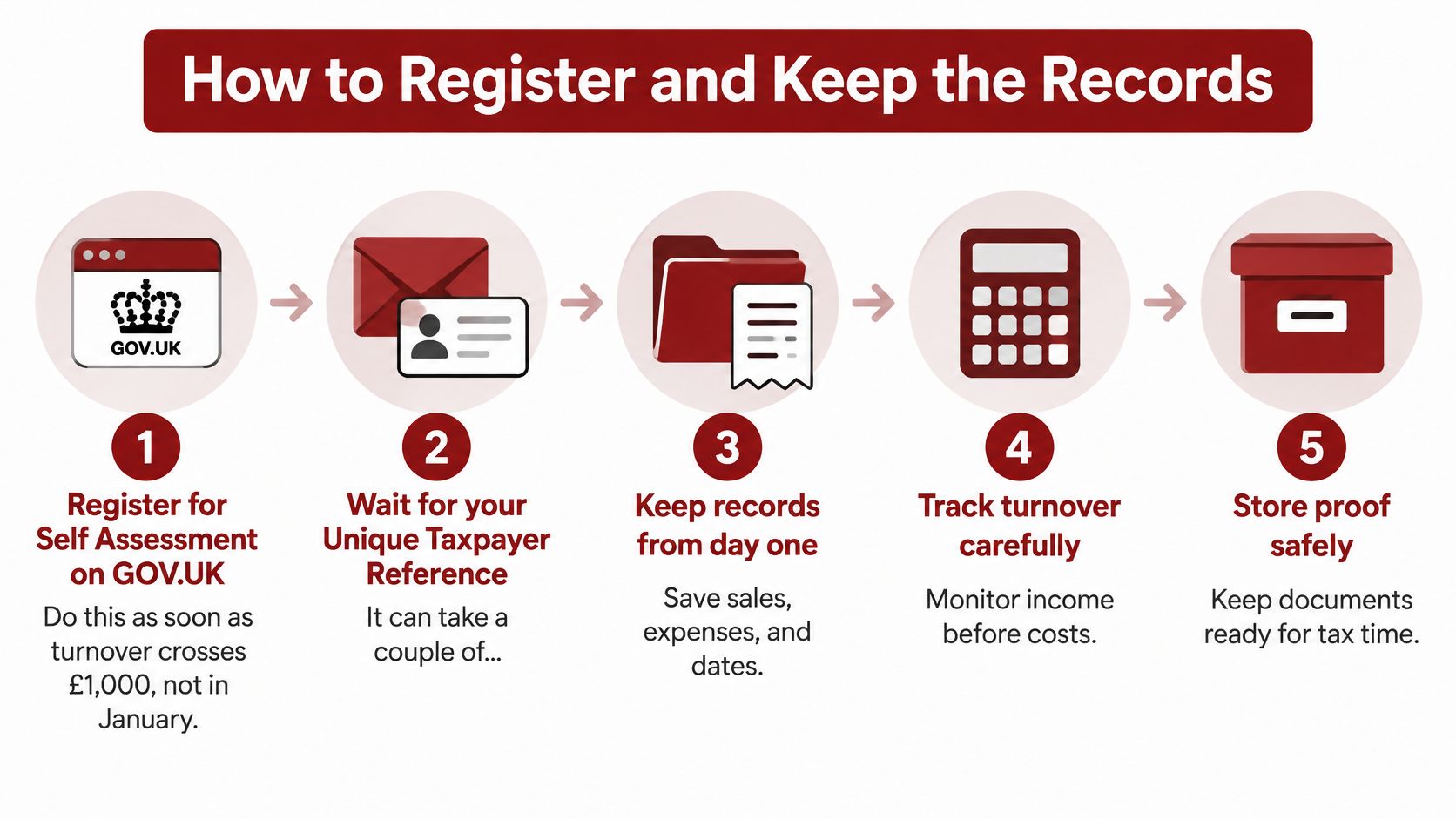
Register through GOV.UK. Use the self-employed registration route and keep a copy of the confirmation. Don't wait until you're ready to submit the return to discover that your tax account still needs setting up.
Find and protect your tax credentials. Keep your Unique Taxpayer Reference, Government Gateway details and any activation correspondence somewhere recoverable. A password manager is more useful than a screenshot buried in your phone.
Separate business banking. Use a dedicated account for client receipts and business spending. This makes reconciliation easier and stops personal shopping from becoming a year-end investigation.
Confirm the accounting basis. Under cash basis, income is generally recorded when received and expenses when paid. If you're considering traditional accounting because of stock, long-running work or other complications, get the treatment agreed before building the ledger.
Record every sale. Include cash, card receipts, app payments and money received outside your main account. Keep invoice references alongside transactions so you can distinguish customer receipts from your own transfers.
Capture receipts and reconcile monthly. Match the ledger to your bank statements, investigate gaps and explain unusual transactions while you still remember them.
Document mixed use. For a shared phone, broadband connection or home workspace, record how you calculated the business share. A defensible method is better than an unexplained percentage.
Preserve the evidence. Keep readable digital copies, a backup and the calculation notes for the applicable statutory retention period. Don't delete records because the return has been accepted.
Use this visual checklist to keep registration and record-keeping connected.
Keep an audit trail, not just a folder
A folder full of receipts doesn't explain which costs reached the return. Give each document a useful filename, connect it to the bookkeeping entry, and retain any note explaining private use or an unusual purchase.
Fintrack's guide to keep digital and paper receipts organized is useful if your evidence currently lives across email, a wallet and a downloads folder. For the broader routine, use our bookkeeping for sole traders guide.
Say you run a consultancy and regularly drive to client premises. A contemporaneous mileage log recording the journey, purpose and business miles is easier to support than a reconstruction from calendar appointments long afterwards.
Your objective is simple: someone reviewing the return should be able to follow receipt, bookkeeping entry, expense category and annual total without guessing.
Complete the SA100 and Claim Allowable Costs
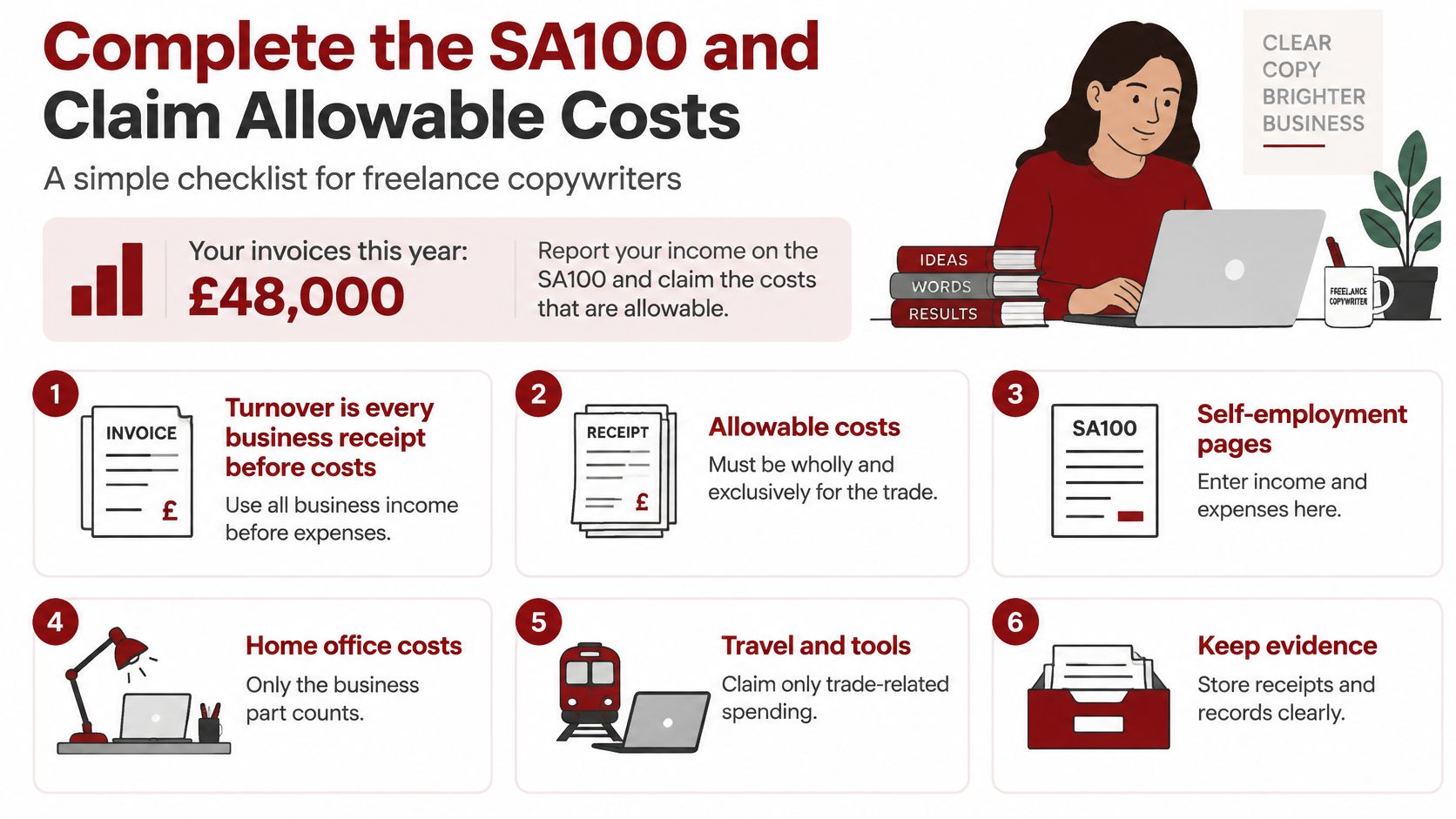
Start with your ledger, not the empty boxes on the screen. The main Self Assessment return, commonly called the SA100, brings together your personal tax position, while the self-employment pages report the trade.
Say you're a freelance copywriter with client invoices, software subscriptions and occasional travel to meetings. Before entering turnover, confirm which invoices belong in the return under your accounting basis. Then reconcile customer receipts, unpaid invoices where relevant, refunds and platform activity.
Make each expense earn its place
The question isn't whether a purchase helped you feel more professional. It's whether the cost qualifies for business tax relief and whether you've applied the correct treatment.
| Cost | The decision to make | Evidence to keep |
|---|---|---|
| Writing software and professional subscriptions | Is it used for the trade, or partly personal? | Supplier invoice and subscription details |
| Professional indemnity insurance | Does the policy cover the business activity? | Policy schedule and payment record |
| Phone and broadband | What business proportion can you support? | Bills and the apportionment method |
| Client travel | Was the journey genuinely for business? | Tickets, appointment details and journey notes |
| Accountancy fees | Does the charge relate to business work? | Invoice identifying the service |
| Home working | Which permitted calculation method suits the circumstances? | Calculation and supporting household records |
| Laptop, tools or vehicle | What treatment applies under your accounting basis? | Purchase invoice, usage details and any finance agreement |
Don't assume durable equipment always receives the same treatment. Cash basis and traditional accounting can treat purchases differently, and vehicles need particular care. Classify the purchase before claiming it rather than putting every item into office expenses.
Use this checklist as a prompt while reviewing the business pages.
Leave personal spending out
Drawings aren't a business expense. Moving money from the business account to your personal account changes where the cash sits, not the profit you earned.
Don't claim ordinary personal meals or the private part of mixed bills. For home working and vehicle costs, avoid combining methods in a way that deducts the same expenditure twice. Our guide to tax-deductible expenses for the self-employed helps you review the categories before entering totals.
For construction subcontracting, reconcile gross income and CIS deductions separately. Reporting only the net amount received can distort the income figure, while overlooking tax already deducted can distort the payment calculation.
Claim the relief you're entitled to, but keep the explanation that makes the claim defensible.
The personal pages matter too. Include the relevant other income, pension contributions, Gift Aid and student loan information, rather than treating the business profit as the whole return.
Finally, compare the tax calculation with your records, not with what you hoped to pay. Check each entry before submitting through your HMRC account, then save the submission confirmation, a copy of the completed return and the calculation with that year's records.
Freelancer Checks Before You Submit
A completed screen isn't proof of a correct return. Before submitting, work through the places where freelancers lose track of income or turn an estimate into an unsupported expense. Keep the underlying documents beside you while you review.
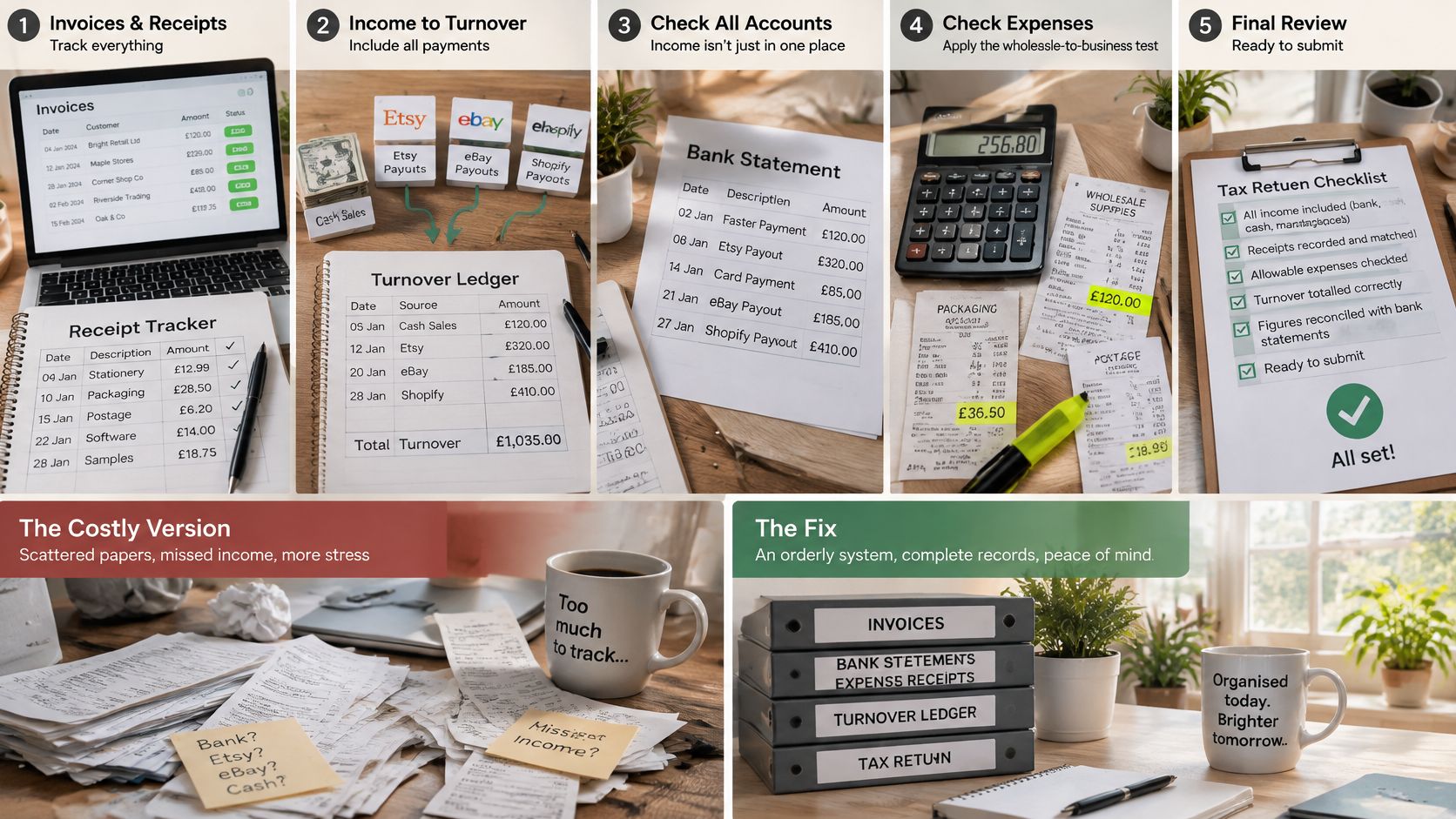
Check the transactions behind the totals
Platform income. The costly version is recording only the marketplace transfer that reaches your bank. Reconcile gross customer income, platform fees, refunds and payouts so the return reports turnover, not net settlement.
VAT treatment. Mixing VAT-inclusive expenses with VAT-exclusive sales produces unreliable profit. If you're VAT registered, check that the figures follow the treatment appropriate to your VAT arrangements rather than stripping VAT out mechanically.
Rounded expenses. A neat total isn't evidence. Inspect estimates and unusually round figures, find the supporting documents, and record any reasonable calculation used where an exact allocation isn't available.
Trading losses. Don't leave the loss position unresolved. Review the available relief choices, decide which applies and keep the calculation that supports the claim.
Separate trades. A writing business and a distinct workshop business may need separate self-employment pages. Running unrelated activities through one bank account doesn't make them one trade.
Plenty of sole traders still prepare the return from a spreadsheet or paper records. Manual preparation can work, but only if every total ties back to the underlying evidence. Open the spreadsheet next to the bank statements and invoices, and reconcile each figure before you copy it into the return. If a line came from memory rather than a document, treat it as unproven until you find the support.
Choose the submission route that fits the return
HMRC's online service suits a straightforward return that it supports. Where CIS deductions, rental income, losses or several income sources sit together, get the return reviewed before you submit rather than guessing which boxes apply.
Use the walkthrough below alongside your records, not instead of checking them.
File when turnover reconciles to the underlying receipts and bank movements, not when the inbox is clear.
If a difference remains unexplained, investigate it. Never park it in miscellaneous expenses to force the spreadsheet to balance.
Pay the Bill and Fund Payments on Account
A new sole trader can budget for the tax on the year just completed and still come up short. The bill may also include an advance towards the following year, so check what is due before deciding how much cash is available to spend.
Many taxpayers miss the 31 January deadline each year, so treat it as both a filing obligation and a cash-flow commitment.
Read the payment breakdown before moving money
Your Self Assessment account may show a balancing payment for the completed year and a payment on account towards the next one. They serve different purposes, even when they are due together.
Check whether payments on account apply to you, then review the calculation and any tax already collected elsewhere. The guide to Self Assessment payments on account explains what HMRC is asking you to pay in advance.
Set up a simple funding routine:
- Forecast from cumulative profit. Update your estimate when income, costs or other earnings change.
- Separate tax savings from spending cash. A dedicated pot shows what is available to use.
- Budget for advance payments. Include the amount due on account, not just the annual tax figure.
- Check the payment reference. Make sure the payment reaches the correct Self Assessment record.
If you expect lower profits, check whether reducing your payments on account is appropriate. Don't reduce them just because cash is tight. If the reduction is too large, you may face an underpayment and interest.
Understand the cost of waiting
Filing and paying are separate obligations. An unsubmitted return and an unpaid bill can therefore lead to different consequences.
Late Self Assessment penalties
| How late | Filing penalty | Payment penalty |
|---|---|---|
| Immediately after the deadline | An initial fixed filing penalty can apply | Interest can arise on overdue tax |
| After the initial payment grace period | The filing penalty remains outstanding | A late-payment penalty can apply |
| After a prolonged filing delay | Daily filing penalties can become relevant | Existing payment charges remain payable |
| At a later penalty milestone | Further tax-linked or minimum filing penalties can apply | A further late-payment charge can apply |
| At a subsequent penalty milestone | Additional filing penalties can apply | Further charges can apply to tax still unpaid |
Check HMRC's current penalty calculation for your circumstances. A small tax bill does not automatically mean a small penalty. If you are struggling to pay, contact HMRC promptly and keep working towards an accurate submission.
Submit figures you believe are accurate. Leave enough time to resolve gaps before the deadline. Pay the amount properly due and keep a record of any correction you later need to make.
Prepare for Making Tax Digital from April 2026
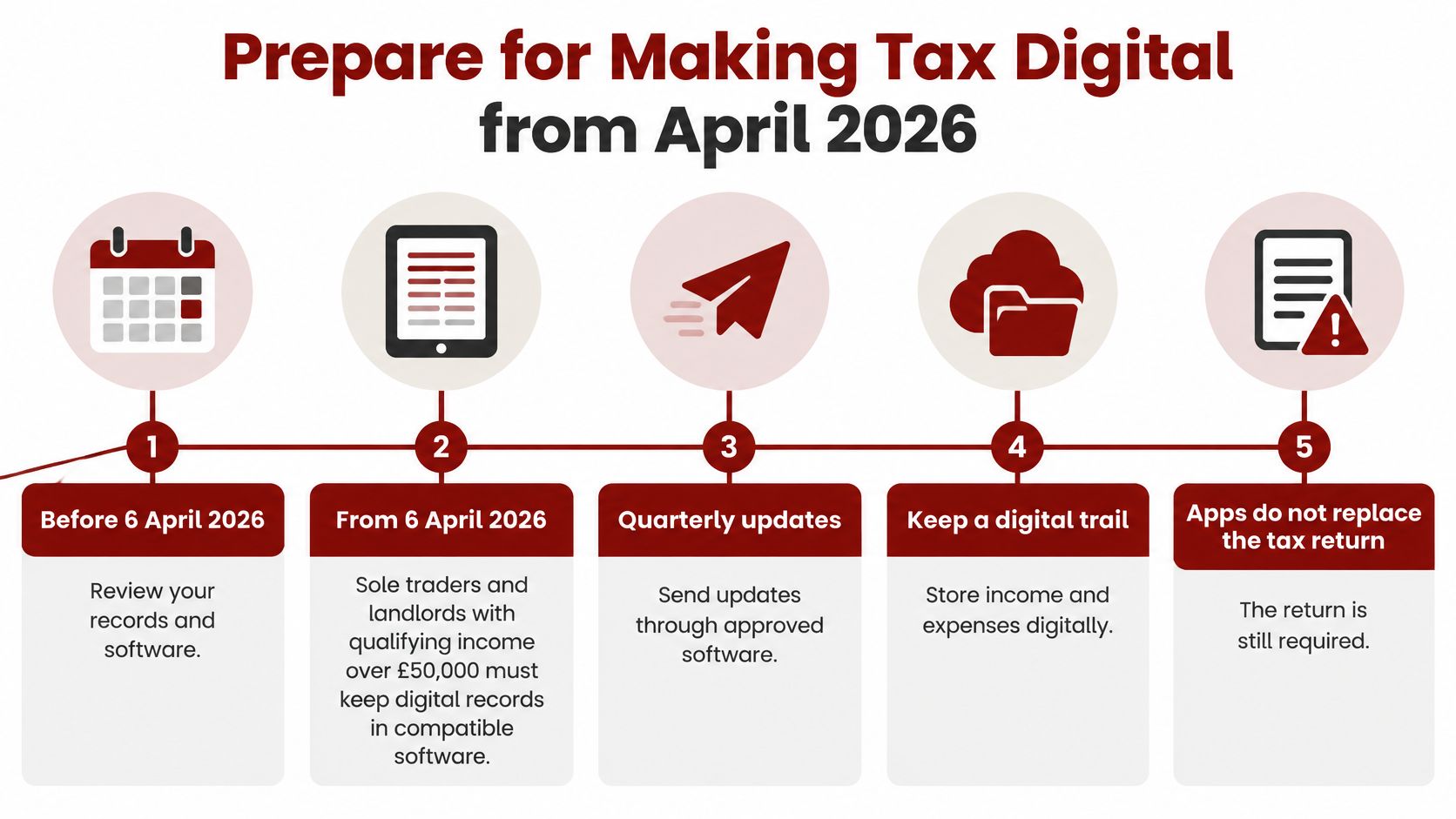
Making Tax Digital doesn't mean quarterly Income Tax bills, and it doesn't replace Self Assessment. It adds digital record-keeping and quarterly reporting on top of the annual return, so buying an app without changing your routine won't be enough.
HMRC's published MTD timetable sets entry at qualifying income over £50,000 from 6 April 2026, with the rollout scheduled to extend to over £30,000 from 6 April 2027 and over £20,000 from 6 April 2028. Treat the later stages as announced plans, but prepare against the earliest date that could catch you.
Test qualifying income, not disposable cash
Qualifying income can combine self-employment and property income, so test the streams together rather than in isolation. The threshold works like the £1,000 trading allowance: it counts turnover, not what's left after expenses. A freelancer whose billings pass £50,000 crosses the first stage even if allowable costs pull taxable profit well below it.
Making Tax Digital income thresholds
| Starts | Qualifying income | What changes | What stays |
|---|---|---|---|
| 6 April 2026 | Over £50,000 | Digital records and quarterly updates through compatible software | Annual return and existing payment framework |
| 6 April 2027 (scheduled) | Over £30,000 | The same quarterly digital duty extends to more taxpayers | Annual return and existing payment framework |
| 6 April 2028 (scheduled) | Over £20,000 | The same quarterly digital duty extends further | Annual return and existing payment framework |
| Below the applicable entry threshold | At or below the relevant threshold | Check ordinary Self Assessment obligations and any continuing MTD requirements | A return may still be required |
Use the income figures HMRC specifies for the relevant assessment period. Reviewing turnover each month is good planning, because drifting over a threshold mid-year is easier than it looks, but a busy month doesn't itself set your legal start date.
This preparation checklist connects the software decision with the reporting workload.
Check eligibility before signing up
HMRC's MTD eligibility guidance says you must be registered for Self Assessment and have submitted a tax return within the last two years before signing up. New traders go through the ordinary registration and filing process first; opening software alone doesn't enrol you.
If you stop trading, change income sources or earn less, check how the rules apply before cancelling reporting tasks. A change in business activity doesn't automatically clear obligations already attached to your tax record.
Do the groundwork now: choose compatible software, test how receipts reach it and block time for the quarterly updates. Keep your tax savings routine exactly as it is, because more frequent reporting isn't a new payment timetable.
File It Yourself or Hand It Over
File the return yourself when the work is straightforward: a single trade, a clear accounting basis, supported expenses and records that already reconcile. You should be able to explain every material total without searching through messages or making a fresh estimate.
Getting help is the better choice when the difficult part is deciding the treatment, not typing the figures. CIS deductions, a vehicle purchase, rental income, a trading loss or uncertain home-working claims can justify a professional review.
Choose based on the unresolved decisions
| File it yourself when | Hand it over when |
|---|---|
| Your records are complete and you understand the entries | You're unsure which income or expenses belong where |
| The bookkeeping agrees with supporting evidence | Bank, platform and ledger totals don't reconcile |
| You can manage the reporting routine consistently | Recurring digital reporting will compete with client work |
| You understand the tax calculation | You need help with relief choices, deductions or HMRC correspondence |
At Action Accountants Limited, we prepare annual Self Assessment returns and liaise with HMRC on clients' behalf, supporting sole traders across North West London and the wider UK. A Basic Self-Assessment Tax Return costs £250 plus VAT per annum, and a NIL Self-Assessment Tax Return costs £200 plus VAT per annum. Our Sole Trader / Partnerships / MTD Starter package starts from £42 plus VAT per month and includes MTD quarterly updates, year-end accounts, the Self-Assessment Tax Return, an annual meeting and ad-hoc advisory.
Make a decision this week
List your turnover to date, confirm that you can access your HMRC account and identify every unresolved bookkeeping question. Then either reserve time to prepare the return yourself or gather the records for an accountant.
Don't hand over an unexplained bank statement and assume the missing context will be obvious. Include sales records, expense evidence, other income details and notes about anything unusual, so the person preparing the return can make informed decisions.
Action Accountants Limited can prepare your sole-trader Self Assessment return, calculate the liability and handle HMRC correspondence on your behalf. Visit Action Accountants Limited to discuss your records, resolve filing questions and choose support for your annual return or MTD reporting.